Back to all posts
7 different tools that automate your business.
Thijs Smit4/24/2026• 11 min read
Most growing businesses hit the same wall at around 10 to 20 people. The manual processes that worked at five people break down at scale. Spreadsheets, email chains, and verbal handoffs become the source of most errors.
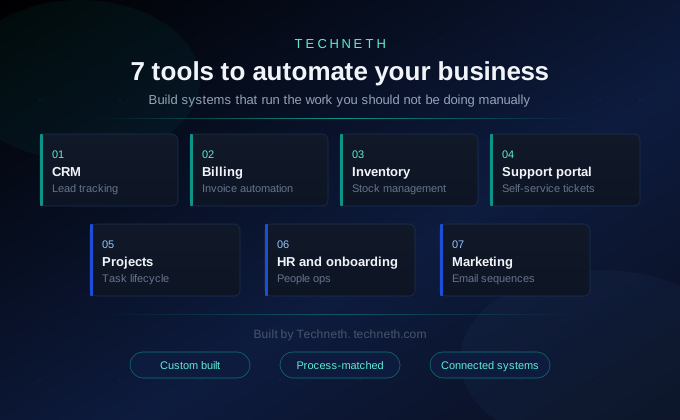
The answer is not hiring more people to manage the same manual work. It is replacing the manual steps with systems that handle them automatically. This article covers seven tools that do exactly that.
Each tool addresses a specific operational bottleneck. Each one links to the relevant Techneth service if you want to build it. The goal is to show where automation applies and what it specifically replaces.
1. CRM: centralised lead tracking
Lead tracking through spreadsheets works until the list reaches a few dozen contacts. After that, follow-ups get missed and no one can see the full picture. A custom CRM gives every lead a structured record tied to your actual sales process.
The system stores every interaction, every email, every call note in one place. When a rep is out sick, another person picks up the thread without asking anyone. No lead gets contacted twice and no high-value prospect gets forgotten.
Pipeline visibility is the other benefit that spreadsheets cannot provide. A CRM shows deal stage, time in stage, and the next required action clearly. Sales managers see the full picture in real time without calling a meeting.
Automation also handles the data entry that consumes rep time after every call. Call notes, email logs, and stage changes update in the system as actions happen. The sales team records information once and every connected system sees it immediately.
2. Billing: automated invoicing and payment follow-up
Manual invoicing through Word templates or PDF editors creates cash flow problems. Someone has to remember to send each invoice and then chase each payment separately. An automated invoicing and billing system handles generation, delivery, and follow-up automatically.
Invoices go out when a project milestone is hit, not when someone remembers. Payment reminders run on a schedule before and after each due date. The accounts receivable process runs without a dedicated person managing it daily.
Recurring billing is a particular pain point for subscription or retainer businesses. Sending monthly statements manually is time that compounds into dozens of hours per year. Automated billing removes that entirely and reduces late payments through consistent, timely communication.
Custom billing systems also integrate with your accounting tools directly. Revenue data flows into your reporting without manual exports or reconciliation work. The finance team sees accurate numbers in real time rather than at month end.
3. Inventory management: real-time stock visibility
Warehouse teams counting stock manually cannot respond to shortages in real time. By the time a shortage is noticed, a sale has often already been missed. An inventory management system tracks every item in real time from arrival to dispatch.
Reorder points are set in the system based on lead times and historical sales data. When stock drops to the threshold, the system alerts the buyer automatically. No more emergency orders, no more out-of-stock messages sent to customers after payment.
The data also improves purchasing decisions over time. You can see which lines sell quickly and which sit on shelves tying up capital. That visibility reduces overstock and improves the margin on every unit sold.
Supplier lead times can also be built into the system as reorder logic. When stock drops low, the system generates a draft purchase order ready to approve. The buyer reviews and confirms rather than building the order from scratch each time.
4. Customer support portal: self-service at scale
A shared email inbox does not scale beyond a small team handling light volume. Requests get missed, duplicated, or resolved inconsistently by different team members. A customer portal lets users log tickets, track status, and find answers themselves.
Simple questions are handled through a structured knowledge base automatically. Complex issues are routed to the right person based on category and priority. The support team spends time on problems that actually require human judgment.
Every interaction is logged against the customer record. When a customer contacts support a second time, the agent sees the full history. That continuity reduces resolution time and removes the frustration of repeating the same context.
Automated support also captures data that improves your product over time. Recurring ticket categories reveal which parts of your product or service need attention. That signal reaches the development team without anyone having to compile a report.
5. Project management: task lifecycle automation
Verbal task assignments and informal handoffs are the most common cause of missed deadlines. When instructions are not written down, they get interpreted differently by different people. Project management tools give every task an owner, a deadline, and a clear status.
Dependencies between tasks are mapped so the team knows what blocks what. When one task finishes, the next one becomes active automatically without a manager prompting it. The team focuses on the work rather than the coordination of the work.
Leadership gets a real-time view of every project without asking for status updates. Delays are visible before they become delivery problems. The data improves future estimates by showing where time was spent on past projects.
Custom project tools also fit your specific methodology rather than a generic one. Sprint-based teams and milestone-based teams need different structures in their system. A purpose-built tool reflects how your team already works rather than changing it.
6. HR and onboarding: from offer to first day automatically
Paper-based onboarding creates the wrong first impression for new employees. Missing documents, delayed system access, and unclear first steps all signal disorganisation. An HR management system automates the full onboarding flow from offer acceptance to first day.
Document signing, policy acknowledgement, and equipment requests all run through one system. Each step is triggered automatically when the previous one is completed. The new hire arrives on day one knowing exactly what to do next.
Ongoing HR processes benefit from the same structure after onboarding is done. Leave requests, performance reviews, and contract updates all run through the same system. HR staff handles exceptions rather than administering the entire process manually each time.
Exit processes benefit from the same automation as onboarding does. System access revocation, equipment returns, and final documentation run on a checklist. Nothing is missed and the process is consistent every time someone leaves.
7. Marketing automation: sequences that run without you
Sending individual marketing emails manually is not a sustainable process at any scale. The timing is inconsistent, the follow-up is forgotten, and the data is never tracked properly. Email and marketing automation handles sequences, timing, and personalisation without manual input.
A new lead enters the system and the first message goes out within minutes. Follow-up messages are triggered by behaviour: an opened email, a clicked link, a visited page. The sequence adapts to what the prospect does rather than running on a fixed calendar.
The data from automated campaigns is also the most useful research available. You can see which messages get replies, which offers get clicks, and which sequences convert. That information shapes the next campaign rather than being lost in a sent folder.
List segmentation also improves when automation handles it based on behaviour. Contacts who clicked a specific link get a different follow-up than those who did not. That precision is impossible to maintain manually across hundreds of contacts.
How the tools connect
Each of these seven tools is more valuable when the data flows between them. A lead generated through a marketing sequence should appear in the CRM automatically. A closed CRM deal can trigger an invoice, a task, and a welcome email together.
Workflow automation connects your tools so data moves between them based on rules you define. Handoffs that currently require a message or email can run without any human input. Every automated connection removes a category of error from your operation permanently.
Business process automation at the broader level maps your entire operation as a connected system. Most businesses have more automatable processes than they realise until someone maps them out. The biggest gains usually come from the handoffs between departments, not within a single tool.
The web application layer is what makes all seven tools accessible from one interface. Rather than switching between five platforms, your team works inside one connected system. That consolidation reduces training time and eliminates the errors that come from switching contexts.
Why this matters to us
At Techneth we build these tools as custom systems rather than configuring off-the-shelf software. Off-the-shelf tools cover the general case. Your operation has specific logic that they do not. A custom build matches your process without forcing your team to adapt to the tool.
The seven categories above are where we see the most operational waste in growing businesses. They are also the areas where custom-built automation delivers the clearest measurable return. Start with the one that causes the most friction in your team right now.
Automation does not change what your business does. It changes how much manual effort is required to do it. Every hour saved on admin is an hour available for work that grows revenue.
A tech partnership with Techneth starts by mapping your current processes before any build begins. That mapping identifies the highest-impact automations for your specific situation. You build what matters first rather than starting with the most visible gap.
The seven tools here cover the categories where time is most consistently lost. Each one is a known operational bottleneck with a known technical solution. Building them removes the friction and lets the business focus on growth.
We have mapped automation opportunities across every industry we work in. The starting points differ, but manual handoffs are consistently where waste hides. Fixing the handoffs first usually delivers more return than buying new tools.
Ready to map your automation opportunities?
Talk to Techneth about business process automation built around your specific operation and the handoffs that are costing you the most.
Also relevant: Workflow Automation | Custom CRM Development | Tech Partnership
FAQ
What is the difference between a custom automation tool and an off-the-shelf platform?
Custom-built automation tools are built around your specific process and data model. Off-the-shelf tools require you to adapt your process to fit their structure. For businesses with specific workflows, custom tools perform better and cost less to maintain.
How long does it take to build a business automation tool?
Timeline depends on the tool and its integrations with your existing systems. A standalone CRM or billing system typically takes six to ten weeks to build. Connected multi-system builds take longer but the scoping session defines the timeline upfront.
Do I need a developer to update the tool after it is built?
Not necessarily. Well-built tools include admin layers for routine configuration changes. Adding new fields, updating sequences, and managing users typically requires no developer involvement. Structural changes or new integrations do require development work.
Which automation should I build first?
Start with the process causing the most errors or consuming the most manual time. For most businesses that is lead tracking or billing, both with direct revenue impact. A scoping session maps your full operation and identifies the highest-value starting point.
Can these tools connect to each other?
Yes. API connections between tools allow data to move automatically between systems. A closed deal in the CRM can trigger an invoice, a task, and a welcome email at once. That connectivity is where the compounding value of automation becomes visible.
What is the return on investment for business automation?
Most automation tools pay for themselves within six to twelve months via time saved. Billing automation and CRM tools tend to show the fastest return through direct revenue impact. The ROI calculation is specific to your volume and current cost of manual processes.
Resources
Latest from the blog
The latest industry news, technologies, and resources.
Ready to start your next project?
Join over 4,000+ startups already growing with our engineering and design expertise.
Trusted by innovative teams everywhere